Turn commuting time into reading time, while still keeping your eyes on the road!
Downloadable e-audiobooks let you listen directly from your phone or mobile device. AAPLD offers three different apps that give you access to over 10,000 audiobooks! Add the apps to your device, connect your device to your car's audio system, and enjoy a best-seller, a fascinating non-fiction, or an older release by your favorite author.
Libby
Libby offers some of today's newest and most popular titles. If it's a bestseller you're looking for, Libby's the app for you! Download the app, select your home library (where your card was issued), and enter your library card number to get started! Here's a sample of what you'll find on Libby:
Don't want to wait for your audiobook? Try Hoopla. All Hoopla titles download instantly and you can borrow up to 15 titles per month. Download the app, enter an email, password and your library card number and you're good to go! Browse thousands of previously released titles, and be sure to check out Hoopla's collection of graphic novels, movies, TV series and more, for off-the-road enjoyment. Here's what you'll find on Hoopla:
Looking for a book on Libby that's currently checked out? Give our newest digital collection, Axis360 a tray. Axis360 is a cooperative agreement that helps provide ebooks and eaudiobooks to residents throughout the state of Illinois. Some of today's most popular titles are available on Axis360, including:
Saturday September 18 is Read An Ebook Day, but any day is a great day to discover the ease and convenience of digital reading. No matter where you are, or what time it is, your library's digital collections are just a few taps away!
Algonquin Area Public Library's four digital collections are easy to access from our website. Simply select the Virtual Library tab on our home page and choose Digital Collections from the drop-down menu. Each digital borrowing platform has its own rules about borrowing periods, limits, and holds. Some allow you to place items on hold, others offer instant borrowing.
To access each collection, AAPLD cardholders can simply click the link on the Digital Collections page, or download free apps for your mobile device. Once you're in, enter your AAPLD library card number, select Algonquin Area Public Library as your home library. If your card was issued by a library other than AAPLD, select the correct library from the list in order to check out materials from your home library's collection.
If you're unsure how, the Digital Collections page contains links to video tutorials. You can also stop by the Adult Services desk for in-person help or a printed brochure.
Here's a sample of what you'll find in each of our digital collections.
Libby/Overdrive
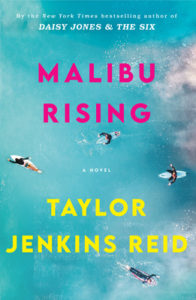
Malibu Rising by Taylor Jenkins Reid - In 1983, four famous siblings throw an epic party to celebrate the end of the summer. But over the course of twenty-four hours, the family drama that ensues will change their lives forever.
hoopla
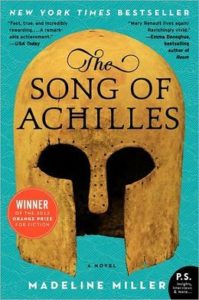
The Song of Achilles by Madeline Miller - The debut novel by the author of the best-selling Circe, The Song of Achilles retells Homer's classic epic The Illiad, as a page-turning tale of adventure, gods, and heroes, war and love.
Axis 360
The Good Sister by Sally Hepworth (audio) - When Fern decides to have a baby for her infertile sister Rose, it shakes the foundations of Fern's carefully structured life and routine, while bringing to light dark secrets from her family's past.
Biblioboard/Indie Author Project Select
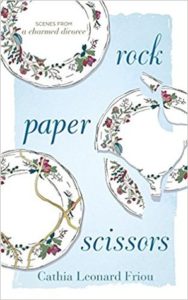
Rock, Paper Scissors: Scenes from a Charmed Divorce by Cathia Leonard Friou - Friou's memoir of her marriage, separation, divorce and reentry into the dating world, is told through a series of vignettes that illustrate the sometimes painful, sometimes joyful moments of a family working toward healing and hope.
Covid-19 has changed many things, including the way we shop. Rather than go from store to store to look and compare, we now turn first to our computers. Sometimes, we complete the entire purchase without ever laying eyes on the item we’ve just bought.
While online shopping is great for many items, when it comes to major purchases like computers, appliances or cars, buying sight unseen is much more daunting. That’s where Consumer Reports can help.
A non-profit organization dedicated to educating and protecting consumers, as well as testing products for quality, CR’s monthly print magazine and subscriber website are trusted sources of accurate product information.
Algonquin Area Public Library District is proud to offer Consumer Reports’ online database to our card-holders. To find it, start at aapld.org and select the Virtual Library drop-down menu. Choose Online Resources. Here, you’ll find an alphabetical list of all the databases the Library offers. Scroll down to Consumer Reports Online, click the link and enter your AAPLD library card number. From here, you can search articles and ratings for thousands of products.
If you’re not an Algonquin library card holder, you can access Consumer Reports Online at our public computers at the Main Library on Harnish Drive, and at the Eastgate Branch.
Issues of the print magazine from the current year are kept with the periodicals at both the Main Library and Eastgate, and are available for check-out, except for the current month’s issue. You’ll also find print copies from the last two years and the current year behind the Adult Services Reference Desk at the Main Library. These are for in-library browsing only.
Want to know more? Give us a call or reach out on chat. An Adult Service staff member will be happy to help.
Taking to the road or sky this summer? Don’t forget to stock up on e-books, e-audiobooks, digital music, video and more from AAPLD!
Digital resources are easy to use, easy to access, and won’t clutter up the car or load down your luggage. If you haven’t used our digital collections before, vacation time is the perfect opportunity to give them a try. You’ll find everything from escapist beach reads to thought-provoking non-fiction, plus materials for kids and teens. In addition to e-books, choose e-audiobooks for listening on the road or in flight, without having to keep track of CDs. We also offer collections of films, and digital music.
Our Digital Collections page has tutorials and links to your favorite app store. Download the correct app for your digital device, enter your AAPLD card number, and enjoy entertainment on-the-go.
Ebooks, eAudiobooks, and more
Libby/Overdrive– Download up to 15 items per month with your AAPLD library card. Libby offers ebooks, eaudiobooks, and magazines for adults, teens and kids. The extensive collection includes the latest fiction and non-fiction, classic literature, and graphic novels.
Hoopla– Download up to 15 items per month, with no holds, no waiting. Just click and borrow! Hoopla’s collection includes e-books, e-audiobooks, and more.
Axis 360– Download up to 5 items per month. Browse the Axis 360 collection for best-selling fiction, non-fiction, e-books and e-audiobooks, for adults and kids.
Indie Author Illinois– Discover up and coming independent authors writing adult and young adult fiction and non-fiction. There’s no waiting for a title, and books can be checked out for as long as you like. However, you must be in the state of Illinois to access this collection.
Digital Audio and Video
In addition to books, Hoopla also offers CDs, movies, and television series, including selections from AcornTV, home to many popular British and Australian series.
Kanopy showcases more than 30,000 of the world’s best films, including award-winning documentaries, rare and hard-to-find titles, film festival favorites, indie and classic films, and world cinema. Check out up to 10 items per month. The Kanopy Kids collection offers unlimited streaming of TV classics like Sesame Street and animated storytimes from award winning books.
Freegal offers access to about 15 million songs, including Sony Music’s catalog of legendary artists and over 40,000 music videos. In total, the collection is comprised of music from over 40,000 labels with music that originates in over 100 countries. There is no software to download, and there are no digital rights management (DRM) restrictions. You can enjoy unlimited streaming and download up to 5 songs per week.
Feeling stressed? Then you’ll love the latest Big Library Read selection, “The Art of Taking It Easy” by psychologist, comedian and author Dr. Brian King.
The Art of Taking It Easy is a practical and hilarious book that encourages readers to embrace humor as a way to reduce stress and live a happier, fuller life.
In his book, King defines stress, discusses it’s origins and how it impacts our bodies and brains. His practical approach offers ways to deal with everyday stress, and other conditions such as depression, anxiety, substance abuse, hypertension and obesity, that occur as a result. But what sets The Art of Taking It Easy apart from other books on this topic is the author’s humor, memorable stories and life-changing tips and instructions gleaned from his personal experience. Read a sample here.
“I wrote The Art of Taking It Easy to put my insights on stress management on paper, so my
daughter, Alyssa, who is now three, can use them one day. Of course, in the process I wrote a book that can be enjoyed by anyone,” said King, in an interview with Libby/Overdrive, sponsors of the Big Library Read.
The Big Library Read is the world’s largest digital book club, with over 20,000 libraries participating. Between April 5 and April 19, library card holders can download copies of The Art of Taking It Easy with no waiting. After reading, check out the discussion questions (click here to download) and share your thoughts on The Big Library Read discussion board. And join the Professional Book Nerds podcasters for a free live conversation and Q&A session with Dr. King, Tuesday, April 13, at noon, central. Click here to register.
If you haven’t used Libby or Overdrive previously, install the free app to get started. You’ll find instructions here. Download your copy, join the fun, and master the fine art of taking it easy!
Your favorite RB Digital magazines now have a new home on Libby!
Starting March 31, RB Digital magazines will no longer be available, so to read your favorite magazines, you’ll need to visit the Libby digital reading platforms. Libby is user friendly and easy to navigate, but if you haven’t used it before, never fear! We’ll walk you through the process to find your magazines’ new location within the app.
Starting out
If you’re new to Libby, begin by downloading the free app to your mobile device. You’ll find it at all major app stores. If you prefer to read on your desktop or laptop, you can also go to https://libbyapp.com/ The website works just like the app.
When you open Libby for the first time, you’ll be prompted to locate your home library and enter your card number. Remember, if your library card was issued by a library other than AAPLD, you’ll need to enter that library as your home library, even if we’re the library you use most often.
If you have Libby installed on one device and want to sync it with another, simply open the app on the first device and tap the Libby logo in the upper right corner. This opens the menu to locate your library and enter your card number.
Kindle users should click on the Read Books With button to select Kindle.
The Get Some Help button allows you set your language preference to read in a language other than English, manage notifications, and more.
Finding the Magazines
At the bottom of the screen you’ll see three buttons:
Library- allows you to browse the entire Libby collection
Middle- takes you to the book you’re currently reading.
Shelf- this is where you find your check-outs and account information.
To find the magazines, Click the Available button at the top and then Magazines on the following page
What’s new? Takes you to a drop down where you can select the New item you want including, New in Magazines.
What’s popular? Takes you to a drop down where you can select the most popular items, including Popular Magazines.
What’s available? Takes you to a drop down where you can select Available Magazines. For our next examples, we’ll use this option.
Borrowing a magazine
The Magazine page shows magazines grouped by title. To see them by category, click “more” in the description box at the top. This will open a drop-down menu that is organized by category. Select a category and browse available magazines. The page will show the current and most recent editions.
The little rectangle/plus sign symbol to the right of each magazine’s name is the Borrow button.
To borrow the current issue, click the Borrow button at the top of each magazine title group. To see inside before you borrow, click on the cover. A new page will open that will show the table of contents and other information about the issue. Use the Borrow button to borrow the magazine.
Past issues can be found by scrolling to the bottom of the page and clicking the downward facing arrow. When you find the magazine you want, click the cover for the table of contents, or use the Borrow button to borrow the magazine.
Magazines you’ve borrowed will appear on your Loans shelf. To read the magazine, click Open in Libby.
Reading Your Magazine
Click or tap the right side of the screen to advance pages. Click or tap the left to go back.
Tap READ THE ARTICLE for a reader friendly view.
To open more options, such increasing font size or changing the background color of the article tap the middle of the screen. The icons at the top allow you to zoom in, change the font size or background, search within the magazine, or mark your place.
To exit the magazine, select the Back button.
Magazine check outs are for 14 days, and there’s no limit to the number of magazines you can borrow. Your magazine loans do not count toward your book check-out limit. Still have questions? Give the library a call and ask for an Adult Services staff member.
“Speak a new language so that the world will be a new world.”
Rumi, Persian Poet
There are plenty of reasons to learn a new language. Plans for a trip abroad, communicating with a new friend or family member, making yourself more valuable at work, even boosting brain health! Studies have shown that bilingual people process information more efficiently, and learning a second language as an adult can help stave off cognitive decline.
Though Covid might have delayed your travel plans, right now is an excellent time to learn a language. Whether you’re brushing up on your skills, or starting from scratch, your library is a great place to start!
Our world language resources include books, audiobooks and an online language learning platform called Mango.
Our world language print collection includes study guides for popular European, Asian, South American and Middle Eastern languages, American Sign Language, plus books to help you learn Latin, Hebrew, Old English and even decipher ancient Egyptian hieroglyphs.
We offer dictionaries, pocket-sized, visual and comprehensive, and also phrasebooks to help you learn the language as it’s spoken in casual or business settings.
Language learning is a natural fit for audiobooks, and our collection of audio courses include Berlitz, Living Language, Fodors and Drive Time. Turn commuting, housework, or treadmill time into a daily language class, that’s both fun and productive.
Explore more of our Language collection by clicking here
If you prefer working with an online resource or an app, Mango is for you! Mango offers lessons in over 70 languages, and English As A Second Language lessons for speakers of 20 different languages. Each language has multiple lessons divided into categories, some have bonus listening and reading lessons, and there is also a collection of world-language films with breakdowns of each line of dialogue. You’ll find these under Mango’s EXPLORE tab.
To get started, download the free Mango app from your favorite app store, or log-in through our website and create an account using your AAPLD library card number. Not an AAPLD cardholder? Check with your home library to see if they subscribe to Mango. But our print and audio materials are available to reciprocal borrowers, so please stop in and browse, place a hold online, or give us a call. ¡Nos encanta ayudar!
To commemorate Black History Month 2021, AAPLD is proud to offer a series of four thought-provoking TED talks, presented by leading Black authors and historians.
The Black History On Your Own Time series runs through the month of February, and there’s no registration required. To watch a talk, simply click the links below, or go to our online program calendar and select a Friday date in February to find that week’s edition. (You don’t have to watch the talks on Fridays, though).
When you’ve finished watching, answer a couple of questions about the talk to be entered into a drawing to win a copy of Barack Obama’s new book, “A Promised Land.”
Pulitzer prize-winning author Wilkerson talks about the Great Migration and its influence on society today. The topic of Wilkerson’s best-seller, “The Warmth of Other Suns,” the Great Migration brought southern Black cuisine, culture, religion, and music to northern cities, and gave rise to a generation that transformed those cities through hard work, and the search for a better life.
Ikard, a professor of African American and Dispora Studies at Vanderbilt University in Nashville, uses the story of Montgomery, Alabama civil rights icon Rosa Parks, to illustrate how Black history is misrepresented and “whitewashed,” and why this harms us all.
The Difference Between Being “Not Racist” and Antiracist by Dr. Ibram X. Kendi (Friday, Feb. 19) Kendi is a contributor to The Atlantic and CBS News, a Boston College humanities professor, and the author of several best-selling books, including How To Be An Antiracist, published in 2019. In his talk, Kendi defines antiracism, explains how it differs from being “not racist,” and challenges listeners to take the next steps toward building a truly racially just society.
Educator Christina Greer profiles Bayard Rustin, the man who organized the historic 1963 March on Washington. TED-Ed Original lessons feature the words and ideas of educators brought to life by professional animators.
The year 2020 saw record levels of digital book circulation worldwide, according to OverDrive, one of AAPLDs digital material providers. Check-outs of ebooks, downloadable audiobooks and digital magazines, from both public libraries and schools, grew by 33% over 2019.
The Covid-19 pandemic is the primary reason for the growth, as more patrons discover how to use their Smartphones, computers and e-reading devices to safely access materials from home. But social justice protests and the Trump presidency had an influence on what patrons were reading, particularly when it came to non-fiction.
Top 10 Fiction Ebooks & Audiobooks (Released in 2020) from Public Libraries Worldwide in 2020
Ready to learn how to download ebooks, magazines and newspapers onto your device and use the library from the comfort of your home? AAPLD’s Kenny Duray will hold a virtual class, Your Library at Home on Monday, Jan. 11, at 7:00 p.m., and Wednesday, Jan. 13, at 10:00 a.m. Click your preferred time to register!
It happens to everyone. You browse the library’s catalog, or you read one of those “Best of…” articles that gives you great ideas for books you’d love to read. You place them on hold. And then? They all arrive at once and you’re overflowing with books!
What’s a book lover to do—especially if you’re not a fast reader, or are too busy to read as much as you’d like? Good news! AAPLD offers some simple tools that allows you to pause your active holds, or even pass an available book on to someone else until you’re ready to read it!
Library Catalog holds
When placing a hold with library staff, you can request the hold be suspended until a more convenient time. For example, if you’re going on vacation, ask the staff member to suspend your hold until after you return. The item will show up in your account as PAUSED until the date you select, and then automatically reactivate.
If you’re placing the hold yourself, after you’ve logged into your account, put the item on hold and chosen your pick-up location, scroll down the page for an option to set your hold activation date. Enter the date you want your hold to activate. Click Submit Request to save your hold and date.
Digital Library holds
Overdrive allows borrows to suspend holds, while still moving up on the title’s wait list. Here’s how you do it:
Sign into your Overdrive account
Click or tap the icon that shows three leaning books.
Select Holds
Select Suspend Hold
Choose the number of days you would like to suspend your hold. Click or tap suspend.
If one of your holds becomes available before you’re ready to read it, you can delay delivery of your ebook and pass it along to another borrower without losing your place. When holds become available, Overdrive generates an email that your hold is ready. You have three days to borrow the hold or opt for later delivery.
Sign into your Overdrive account, and go to your Holds page.
Select Deliver Later next to the title.
Choose the earliest date you’d like the title to be delivered. After that date, you’ll get a copy when the next one is available.
Select Confirm
Change your delivery date by selecting Edit Hold. Set a new date, or select As Soon As Possible to receive the next available copy.

 Libby offers some of today's newest and most popular titles. If it's a bestseller you're looking for, Libby's the app for you! Download the app, select your home library (where your card was issued), and enter your library card number to get started! Here's a sample of what you'll find on Libby:
 Don't want to wait for your audiobook? Try Hoopla. All Hoopla titles download instantly and you can borrow up to 15 titles per month. Download the app, enter an email, password and your library card number and you're good to go! Browse thousands of previously released titles, and be sure to check out Hoopla's collection of graphic novels, movies, TV series and more, for off-the-road enjoyment. Here's what you'll find on Hoopla:
 Looking for a book on Libby that's currently checked out? Give our newest digital collection, Axis360 a tray. Axis360 is a cooperative agreement that helps provide ebooks and eaudiobooks to residents throughout the state of Illinois. Some of today's most popular titles are available on Axis360, including:


 Covid-19 has changed many things, including the way we shop. Rather than go from store to store to look and compare, we now turn first to our computers. Sometimes, we complete the entire purchase without ever laying eyes on the item we’ve just bought.
 Taking to the road or sky this summer? Don’t forget to stock up on e-books, e-audiobooks, digital music, video and more from AAPLD!


 Feeling stressed? Then you’ll love the latest Big Library Read selection, “The Art of Taking It Easy” by psychologist, comedian and author Dr. Brian King.
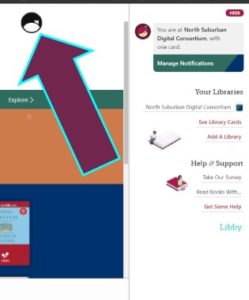 If you have Libby installed on one device and want to sync it with another, simply open the app on the first device and tap the Libby logo in the upper right corner. This opens the menu to locate your library and enter your card number.
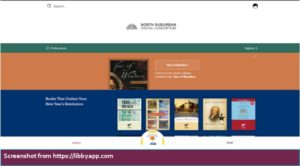 At the bottom of the screen you’ll see three buttons:
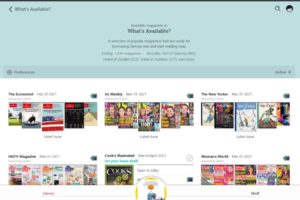 The Magazine page shows magazines grouped by title. To see them by category, click “more” in the description box at the top. This will open a drop-down menu that is organized by category. Select a category and browse available magazines. The page will show the current and most recent editions.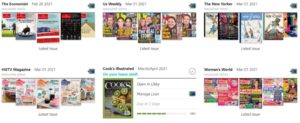



 Our world language print collection includes study guides for popular European, Asian, South American and Middle Eastern languages, American Sign Language, plus books to help you learn Latin, Hebrew, Old English and even decipher ancient Egyptian hieroglyphs.
 If you prefer working with an online resource or an app, Mango is for you! Mango offers lessons in over 70 languages, and English As A Second Language lessons for speakers of 20 different languages. Each language has multiple lessons divided into categories, some have bonus listening and reading lessons, and there is also a collection of world-language films with breakdowns of each line of dialogue. You’ll find these under Mango’s EXPLORE tab.
 To commemorate Black History Month 2021, AAPLD is proud to offer a series of four thought-provoking TED talks, presented by leading Black authors and historians.
 Pulitzer prize-winning author Wilkerson talks about the Great Migration and its influence on society today. The topic of Wilkerson’s best-seller, “The Warmth of Other Suns,” the Great Migration brought southern Black cuisine, culture, religion, and music to northern cities, and gave rise to a generation that transformed those cities through hard work, and the search for a better life.

 The year 2020 saw record levels of digital book circulation worldwide, according to OverDrive, one of AAPLDs digital material providers. Check-outs of ebooks, downloadable audiobooks and digital magazines, from both public libraries and schools, grew by 33% over 2019.
 It happens to everyone. You browse the library’s catalog, or you read one of those “Best of…” articles that gives you great ideas for books you’d love to read. You place them on hold. And then? They all arrive at once and you’re overflowing with books!